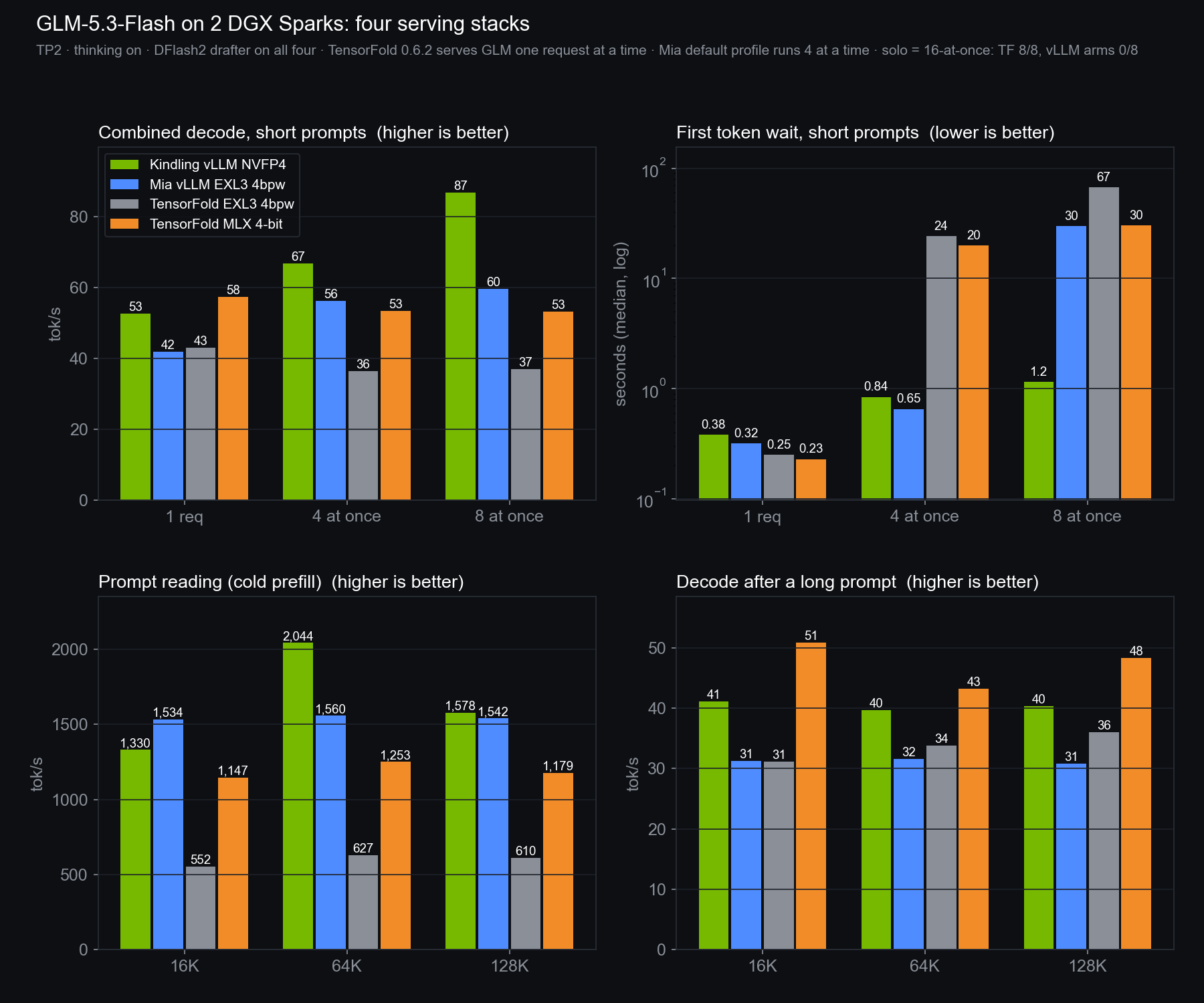
Same model, same two Sparks, four ways to serve it: Kindling's vLLM with NVIDIA's NVFP4, Mia's vLLM kit with EXL3, and TensorFold 0.6.2 with EXL3 and with MLX 4-bit. Kindling wins crowds and long prompts. TensorFold MLX wins single-user speed and repeats, with byte-identical output. The best-looking volcano came from TensorFold EXL3, after a one-character fix.
Headless-browser recordings of each model's generated code on a fixed-step 24 fps virtual clock, 75 s from the first frame, no interaction. Not recordings of inference. Cards below are in visual rank by eye; one run each.
Thinking on for every row except the last three, which use Kindling's own decode test with thinking off at temperature 0. Best value per row highlighted.
TensorFold 0.6.2 serves GLM one request at a time, so its 4- and 8-at-once rows are queueing. Mia's default profile runs four at a time; requests 5–8 queue. TensorFold EXL3 was not run on the thinking-off test. The last row counts byte-identical replies out of 8 prompts.
The earlier round, before Mia's kit joined. TensorFold EXL3 built the cleanest island; on the volcano the clean-versus-repaired split went the other way, which is why neither round ranks the formats.
TensorFold EXL3 left, TensorFold MLX 4-bit (two repairs) right. Weather buttons clicked at the same virtual seconds on every arm: sun 0 s, rain 6 s, storm 13 s, hurricane 20 s, sun 27 s.
Read before comparingThe setup, the caveats, the limits.
Hardware: two DGX Sparks (GB10, 128 GB each), tensor-parallel 2 over 200 Gb RoCE. All four stacks used an incoai DFlash2 drafter; that drafter is licensed CC BY-NC-ND.
Stacks: Kindling kindlingai/glm-5.3-flash-gx10 @ d5abfe1 on nvidia/GLM-5.3-Flash-NVFP4. Mia MiaAI-Lab/GLM-5.3-Flash-EXL3-2x-DGX-Sparks @ 6278ecb, published image, default profile. TensorFold 0.6.2 @ 56e2e3e (the latest release when run) with Mia-AiLab/GLM-5.3-Flash-EXL3-TR3-4bpw and with TensorFold/GLM-5.3-Flash-MLX-4bit-MTP.
What each comparison isolates: TensorFold EXL3 vs TensorFold MLX is the same engine with two quantizations. Kindling vs Mia is NVFP4 vs EXL3 on vLLM, but two different vLLM builds with their own patches, and Mia's kit pins a newer drafter revision. Kindling vs TensorFold mixes engine and format.
Exactness: TensorFold gave byte-identical replies run to run and alone versus 16 at once (8/8 both). Kindling repeated itself (8/8) but changed under load (0/8); Mia's kit varied in both (0/8, 0/8).
Incidents: a first Mia speed run was thrown out after two copies of the harness hit the same server; every Mia number here is from the clean rerun. TensorFold ignores the switch Kindling's test uses to turn thinking off, so its first thinking-off pass was still thinking; the published row uses the switch TensorFold honours and was checked to produce zero reasoning tokens.
Volcano prompt, verbatim: "Create a single self-contained HTML file using Three.js that renders a visually spectacular, bright, colorful, and highly detailed 3D animated volcanic eruption scene with glowing lava, thick ash, flying ejecta, and dramatic environmental effects.
Requirements:
* Use Three.js loaded from a CDN.
* Everything must be contained in one HTML file and work directly when opened in a modern browser.
* Fill the entire browser viewport edge to edge with the 3D scene. Do not leave margins, borders, blank space, or unused areas.
* Create a bright, polished, AAA-quality stylized 3D visual style with vibrant colors, detailed materials, cinematic lighting, soft shadows, atmospheric depth, and excellent visibility.
* Create a large detailed volcanic island landscape surrounded by colorful terrain, a tropical coastline, turquoise sea, black sand beaches, jungle vegetation, a small village with huts and a wooden pier near the shore, and distant smaller islands.
* Make the volcano the clear central focus of the scene, large enough to see important details such as the crater rim, layered rock strata, old solidified lava channels, fumaroles, and vegetation climbing the lower slopes.
* Position the volcano in the center of the island at the beginning of the animation, calm and dormant, with a thin wisp of steam rising from the crater.
* Include a small research station or observation post on the lower slope with instruments, antennas, and warning lights.
* Start with a brief calm pre-eruption moment with subtle atmospheric movement such as light steam drifting, birds circling, gentle waves on the shore, and warning lights beginning to blink.
* Show the ground beginning to tremble, with small rocks tumbling down the slopes and dust shaking loose from the crater rim.
* Show the crater gradually beginning to glow from within, brightening from dull red to intense orange-white as pressure builds.
* Create bright, powerful animated lava fountains erupting from the crater with multiple layers, including a bright white-yellow core, glowing orange lava blobs, and long arcing trails of molten rock.
* Add intense heat glow and warm light from the lava reflecting onto the crater walls, the ash cloud, the nearby slopes, and the research station.
* Create large volumes of thick animated ash and steam billowing upward from the crater into a towering eruption column, expanding outward at the top into a broad anvil shape.
* Make the ash cloud roll, expand, swirl, and rise naturally instead of appearing as simple static clouds, with the underside lit orange by the lava.
* Add glowing volcanic bombs and ejecta launched in ballistic arcs from the crater, leaving glowing trails and landing on the slopes with bursts of sparks and dust.
* Add smaller particles, sparks, glowing embers, ash flakes, and drifting cinders throughout the eruption area.
* Show rivers of glowing lava breaking over the crater rim and flowing down the flanks in branching channels, with a bright liquid core and a cooling darker crust forming on the surface as it advances.
* Make nearby trees, grass, and vegetation react as the lava and hot ash approach, bending, catching fire, and burning.
* Show steam explosions where lava reaches the sea, with white steam plumes and hissing spray.
* Add visible atmospheric distortion or heat shimmer above the lava and crater if possible.
* Add occasional volcanic lightning flickering inside the ash column.
* Include subtle camera vibration and a brief cinematic camera shake during the initial tremor and the main eruption without making the scene difficult to watch.
* Use a smooth cinematic camera that begins close to the coastline and village, then slowly pulls back and rises to reveal the full eruption, the lava rivers, and the towering ash column, while keeping the volcano and major effects clearly visible.
* As the camera rises, smoothly reveal more of the colorful island, the coastline, the sea, clouds, and the distant horizon.
* Keep the volcano large and prominent throughout the sequence.
* Add layered clouds at different heights, with the eruption column eventually climbing toward and punching through them.
* Use a bright blue daytime sky with colorful white clouds and strong sunlight so the lava, ash, glow, and environment remain clearly visible.
* Avoid a dark night scene. The result should be bright, vibrant, high-contrast, and visually clear.
* Use realistic-looking shadows and dynamic lighting, including the changing influence of the bright lava glow.
* Keep the viewport visually dense and impressive throughout the animation, with no excessive empty sky or unused space.
* Use layered terrain, sea, vegetation, ash, clouds, and atmospheric effects to maintain visual interest as the camera pulls back.
* The animation should follow a clear sequence: calm volcano with steam wisp → warning lights blink → ground trembles and rocks tumble → crater glows brighter → lava fountain erupts → ash column rises → volcanic bombs arc outward → lava rivers flow down the flanks → vegetation burns → lava reaches the sea and steam explodes → ash column punches through the clouds with lightning → camera pulls back to reveal the whole island.
* Use smooth animation for the lava, ash, ejecta, sparks, particles, vegetation, sea, steam, clouds, lighting, shadows, and camera movement.
* Do not add overlay text, titles, labels, HUD, captions, menus, buttons, borders, or UI elements over the scene.
* The browser viewport should contain only the animated 3D volcanic eruption scene, filling the entire screen edge to edge.
* Start the animation automatically when the page loads.
* Add smooth camera controls only if they do not obstruct the scene or interfere with the cinematic composition.
* Optimize for smooth performance in a modern browser.
* No build process is allowed, and there must be no external dependencies other than the Three.js CDN."
Island prompt, verbatim: "Create an interactive tropical island weather simulator in Three.js. Let me switch between sunshine, rain, thunderstorms with lightning, and a hurricane. Make the island and surrounding ocean react to the weather, with smooth transitions and convincing motion. Include orbit and zoom controls. Make it mobile-friendly with touch controls, easy-to-tap weather buttons, a responsive layout, and smooth performance on phones. Make it visually impressive, and choose your own style and details.
Deliver everything in one HTML file, with no external libraries besides Three.js and its official addons."
Sampling: temperature 1.0, top_p 0.95, thinking on, no output cap beyond the serving window. One generation per stack per prompt, so the visual ranks describe these runs, not the quantizations. Originals are published untouched; every repair is a separate copy with its diff.